


Someone recently asked me:
“Do I really need to understand all these AI terms such as tokens, GPT’s etc.?”
Here is what I believe:
AI terminology isn’t about turning you into a technologist.
It’s about helping you feel in control.
When you understand the language, you stop feeling like a spectator in AI conversations and step back into the driver’s seat of your HR strategy.
💛 Why this glossary matters for every leader:
It lets you follow and lead AI conversations instead of silently nodding.
It helps you challenge vendors and look beyond buzzwords.
It supports HR’s shift from tech consumer to tech creator.
It helps you rewrite the narrative that HR “doesn’t get” technology.
I’ve explained these terms in the exact order your brain naturally learns them.
We begin with the simple concepts - your words, your instructions, your prompts.
Then we move into how AI models work, what they’re capable of, and how they use your data.
Once that foundation is set, we explore accuracy, safety, integration, and finally the agentic tools that let HR automate and create.
Each bucket builds on the previous one, helping you understand AI without ever feeling lost or overwhelmed.
1. Foundation:
Before we talk about AI systems, we begin with the basics - your words, your instructions, and how AI responds.
Prompt
Your instructions or questions to the AI.
A prompt is what you tell the AI to do - the input that guides its output.
It can include:
the task (summarize, rewrite, draft, analyze)
the audience (employees, managers, leaders)
the tone (formal, friendly, neutral)
the format (bullets, email, table, policy summary)
the constraints (keep it short, use plain language, use our policy only)
Better prompts → better outputs. Prompting is a skill HR leaders can and should build.
Example prompt framework:
Role – Tell the AI who it should act as.
“You are a senior HR Policy & Program advisor.”
Context – Provide background or sources.
“Use the attached HR policy document and our employee handbook.”
Action – Say exactly what you want and in what format.
“Summarize the key changes in 3 bullet points for managers.”
HR Leader Tip:
Ask vendors:
“How much prompting skill is required to use your tool effectively?”
“Does your system support structured prompt frameworks?”
AI Model
A trained system that recognizes patterns and produces outputs.
An AI model is a mathematical system trained on large amounts of data.
It doesn’t memorize; it learns statistical patterns such as how language flows, how concepts relate, how questions map to answers.
When you use an AI tool such as ChatGPT, you’re interacting with an underlying model that has learned these patterns and uses them to generate responses.
HR Leader Tip:
Ask vendors:
“What model powers your system, and why that one?”
“Is it optimized for HR tasks or a general model?”
“Where does the model process data (cloud vs on-prem)?”
“Do you plan to add or support additional models in the future?”
Training an AI Model
How an AI model learns from example data.
Training is the process where a model is exposed to huge datasets (like text, code, or other content) and learns relationships within that data.
In HR language: training is like “onboarding + years of experience” for the model - it’s how it becomes capable.
HR Leader Tip:
Ask vendors:
“Is your model trained on general data, industry-specific data, or HR datasets?”
“How often is the model retrained or updated?”
“Can we add our own organization’s data safely?”
Inference
The process of an AI model producing an output from your input.
Inference is what happens after you send a prompt to an AI system.
It’s the real-time process where the model:
reads your input
breaks it into tokens
applies its learned patterns
generates a response
No new learning happens during inference! Learning happens during training.
Inference is simply the execution phase where the AI uses what it already learned to respond, summarize, classify, or take an action.
Every time you chat with an AI, ask a copilot a question or use a voice agent you are triggering inference.
Systems with faster inference feel more responsive and are more suitable for:
employee-facing tools
high-volume HR queries
real-time support
Example:
An employee asks:
“What’s the process for updating my bank details?”
The AI model instantly interprets the question, retrieves the relevant policy, and generates a clear answer.
That entire behind-the-scenes process from reading → reasoning → replying — is inference.
HR Leader Tip:
Ask vendors:
“How fast is your model’s inference time during peak HR periods?”
“Does inference happen on-device, in the cloud, or in a private environment?”
“What affects response speed — model size, context window, or compute limits?”
“Can inference be optimized for employee self-service scenarios?”
Tokens
A small unit of text that the model reads.
AI models don’t process an entire paragraph at once.
They break it into tokens that are small chunks of text (often pieces of words).
The number of tokens in your prompt and documents affects:
how much the model can “see” at once
how long it takes
how much it costs (many tools bill per token)
Every AI model has its own way of calculating tokens, below is an example for OpenAI.
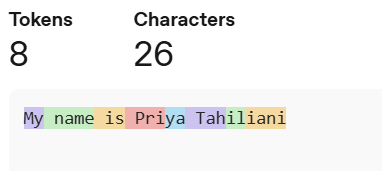
A helpful rule of thumb is that one token generally corresponds to ~4 characters of text for common English text. This translates to roughly ¾ of a word (so 100 tokens ~= 75 words)
HR Leader Tip:
Ask vendors:
“How are costs calculated? By tokens, messages, or usage tiers?”
“Will this tool become expensive with long documents?”
“Does your tool optimize token usage automatically?”
2. Model Types: Understanding the “Engines” Behind AI
Once you know how you interact with AI, the next step is understanding the models themselves - the engines that power every AI tool. These terms explain the different kinds of AI and what makes each one useful.
LLM (Large Language Model)
A model trained on very large amounts of text to understand and generate language.
LLMs, like GPT-4, are powerful AI models that can:
summarize documents
write emails or policies
answer questions
analyze text for patterns or sentiment
They learn from broad, large-scale datasets so they can handle many topics and tasks.
HR Leader Tip:
Ask vendors:
“Which LLMs does your product support or integrate with?”
“Do you use a single model or switch depending on the task?”
“How do you ensure accuracy for HR-specific content?”
Small Language Model (SLM)
A smaller, more efficient language model.
SLMs are compact models designed to be:
faster
cheaper to run
easier to deploy inside organizations
They’re ideal for focused internal tasks, like answering FAQs from your own documents.
HR Leader Tip:
Ask vendors:
“Can SLMs be deployed privately for sensitive HR content?”
“How do you balance speed and accuracy?”
Generative AI
AI that creates new content.
Generative AI uses models (like LLMs) to generate original text, images, or other content - not just retrieve information.
In HR, it can draft job descriptions, write communication drafts, summarize survey comments, or propose development plans.
HR Leader Tip:
Ask vendors:
“Where does your tool generate content versus retrieve information?”
“What safeguards exist to prevent incorrect generation of data?”
“Can we restrict generative functions in sensitive areas?”
Classic AI
AI built for one specific task, following fixed rules or narrow logic.
Classic AI systems do one job at a time like classifying data, detecting patterns, routing tickets, or playing chess.
Each use case traditionally needed its own separate model, designed and tuned for that task.
They are predictable and stable but not flexible or adaptable.
By contrast, Generative AI is general-purpose AI:
the same model can perform many different tasks simply by changing the prompt or instructions.
HR Leader Tip:
Ask vendors:
“Which parts of this workflow use classic rule-based automation?”
“Can we configure the logic ourselves?”
“How do you combine classic automation with AI-driven reasoning?”
Reasoning Model
An AI model optimized to think step-by-step and solve complex problems.
A reasoning model is designed not just to generate text but to analyze, plan, and make structured decisions. It breaks tasks into steps, evaluates possible actions, and follows a chain of logic.
These models improve accuracy for analytical HR tasks such as interpreting surveys, summarizing audits, or evaluating employee data patterns.
Example:
An AI agent that explains why it categorized certain employee comments as “workload concerns” by walking through its reasoning.
HR Leader Tip:
Ask vendors:
“Is your system built on a reasoning model?”
“Can we see the reasoning steps or chain-of-thought?”
“How does your model handle complex HR scenarios requiring judgment?”
Deterministic Output
The same input always produces the same output.
Deterministic AI behaves predictably. When given identical data or instructions, it generates identical responses every time unlike generative AI, which may produce variations.
Deterministic outputs are useful for compliance-heavy HR workflows requiring consistency.
Example:
A deterministic classification model that always assigns a specific type of HR ticket to the same category.
HR Leader Tip:
Ask vendors:
“Where in your system do you guarantee deterministic behavior?”
“Can we choose between deterministic and generative modes?”
“How do you manage consistency in high-risk HR scenarios?”
3. Capabilities: What AI Can Actually Do
Now that we understand the types of AI models, we explore their practical capabilities - how fast they respond, how well they reason, and the different types of inputs they can handle. These terms help you understand what the real experience will feel like for employees and managers using AI tools every day.
Chain of Thought
The step-by-step reasoning an AI uses to arrive at an answer.
Chain of thought refers to the internal reasoning steps an AI may generate to solve a problem. It’s the “thinking trail” - the sequence of logic the model follows before producing a final answer.
In many systems, this chain of thought is hidden, because exposing it can reveal sensitive model behavior, create security risks, or confuse users.
Instead, models usually provide only the final answer, unless specifically built to show a simplified reasoning summary.
Understanding chain of thought helps you know how the AI arrived at a conclusion, especially for tasks requiring logic, calculations, or multi-step decisions.
Example:
If AI is asked:
“Is an employee eligible for parental leave?”
The chain of thought might be:
Check employment type
Check tenure
Check local legal requirements
Check company policy exceptions
Provide eligibility decision
You see only the answer, but the model followed these steps internally.
HR Leader Tip:
Ask vendors:
“Does your system use chain-of-thought reasoning for HR decisions?”
“Can we get a simplified rationale so decisions are explainable?”
“How do you ensure the reasoning is transparent without exposing sensitive model logic?”
Compute Power
The processing capacity the AI uses to “think.”
Compute power is the technical resource behind the scenes.
More compute allows:
faster responses
deeper reasoning
handling bigger inputs (more tokens, longer documents)
Understanding compute at a high level helps HR leaders make sense of why some AI tasks are more resource-intensive and more expensive than others.
HR Leader Tip:
Ask vendors:
“How resource-intensive is your system?”
“Will response times slow down with bigger documents?”
“How do you scale compute for peak HR cycles?”
Multimodal
An AI model that can process multiple input types (text, images, audio, etc.).
Multimodal models can:
read text
interpret images (e.g., a screenshot of a policy)
listen to audio
in some cases, work with video
This broadens how AI can support HR beyond just chat into document images, slides, forms, videos and more.
HR Leader Tip:
Ask vendors:
“Can this system read image-based documents like employee files or screenshots?”
“Does it handle audio or video in employee experience scenarios?”
“Are multimodal features included or an add-on?”
Latency
The time the AI takes to respond to a request.
Latency is the delay between your prompt and the model’s reply.
Some tasks finish almost instantly; others take longer because they involve:
large documents
complex reasoning
multiple tool calls
For HR, reasonable latency is important for user experience especially in employee-facing tools.
HR Leader Tip:
Ask vendors:
“What is your average response time?”
“Does speed change with longer documents or more users?”
“Can latency be guaranteed during peak HR seasons?”
4. Data + Context: How AI Uses Your Information
Now we shift into how AI handles your company’s documents, policies, and knowledge. These terms explain how AI retrieves, grounds, and interprets your organizational data.
Document Grounding
AI answering based only on your approved documents.
Grounding means that when the AI answers, it relies on your content (like HR handbooks, policies, FAQs) rather than generic internet knowledge.
This is critical in HR because:
policies differ by organization
legal and compliance risks are high
accuracy builds employee trust
Grounding is the foundation for making AI useful and safe in HR contexts.
HR Leader Tip:
Ask vendors:
“Which documents does your tool use for grounding?”
“Can we control which sources it can or cannot reference?”
“How do we ensure outdated documents aren’t used in answers?”
“Is document grounding included in the price?”
RAG (Retrieval-Augmented Generation)
AI that retrieves relevant documents before generating an answer.
In RAG systems, the AI:
Searches your document store for relevant content
Retrieves key passages
Uses generative AI to craft an answer based on those passages
This combination of retrieval + generation delivers responses that are both fluent and grounded in your actual data - which significantly reduces incorrect or generic answers.
HR Leader Tip:
Ask vendors:
“Do you use RAG to minimize hallucination?”
“Can we see which documents were retrieved to form a given answer?”
“Can we restrict responses to retrieved content only?”
Vector Database
A database that stores and searches by meaning, not just keywords.
A vector database converts text into numerical vectors that represent meaning.
This allows for “semantic search” - finding information that is conceptually similar, even if the exact words don’t match.
Example:
Search for “employee happiness” and get documents tagged as “engagement” or “well-being,” because the system recognizes they’re related in meaning.
HR Leader Tip:
Ask vendors:
“Does your system search by meaning or just keywords?”
“How do you ensure the vector database stays updated with our latest HR documents?”
“Where is the vector database hosted?”
Context Window
How much information the model can consider at once.
The context window is like the model’s short-term memory.
If the window is small, it can only “see” a limited number of tokens at one time.
If it’s large, it can read long policy documents, full email threads, or multiple files in one go - and respond with a better, more holistic answer.
HR Leader Tip:
Ask vendors:
“How long of a document can the AI consider at once?”
“Can it handle entire policies or only snippets?”
“How do you support context windows for audits or investigations?”
Anchoring
Forcing the AI to stick to a specific document or source.
Anchoring restricts the AI so it only answers using the documents you specify. This prevents hallucinations and ensures consistency with approved HR policies, handbooks, and guidelines.
It’s one of the most important methods for making AI reliable in HR.
Example:
“Answer only using content from the official employee handbook dated 2024.”
HR Leader Tip:
Ask vendors:
“Can your system anchor responses to only our approved HR documents?”
“How do you prevent the AI from going outside those sources?”
“Can we control which documents the AI must anchor to?”
AI Memory
AI that remembers previous interactions or preferences.
Memory allows AI systems to:
recall what you asked previously
remember your role (e.g., HRBP vs manager)
adapt responses to your tone and style
This creates continuity and makes AI feel more like a partner than a tool.
HR Leader Tip:
Ask vendors:
“What does the AI remember between interactions - and what does it NOT remember?”
“Can memory be controlled or turned off for compliance reasons?”
“How does the system store or protect personal preferences?”
5. Behavior + Safety: How AI Stays Accurate and Compliant
Once the AI is connected to your data, we focus on accuracy, risk, and trust. These terms explain how AI avoids errors, stays aligned with policy, and operates safely in HR environments.
Hallucination
It is when Gen AI makes up an answer with confidence.
Imagine a friend who doesn’t know the answer…
but refuses to admit it so they improvise beautifully and incorrectly.
That’s an AI hallucination.
Now that you’ve seen model, grounding, RAG, and context, we can define this clearly:
Hallucinations happen when:
the model is relying only on learned patterns (not your data)
there is no grounding or retrieval step
the model fills gaps by “guessing” what seems plausible
This is why:
Document Grounding and RAG are crucial because they anchor responses in your real content.
Well configured copilots (for example, a custom Microsoft Copilot Agent with restricted knowledge sources and instructions) tend to hallucinate much less, because they are designed to retrieve from defined repositories rather than invent answers
HR Leader Tip:
Ask vendors:
“How exactly does your system reduce or handle hallucinations in HR-sensitive use cases?”
Guardrails
Rules and safety boundaries that control how an AI behaves.
Guardrails are the constraints that prevent an AI system from giving inappropriate, unsafe, or irrelevant outputs. They define what the AI can and cannot do, including tone, confidentiality, allowed actions, and restricted topics.
Guardrails ensure consistency, reduce risk, and protect employees by keeping the AI aligned with organizational policies and compliance expectations.
Example:
A Copilot agent may be allowed to summarize policies but not generate legal interpretations.
HR Leader Tip:
Ask vendors:
“What guardrails are built into your system?”
“Can we add our own HR-specific guardrails?”
“How do you prevent inappropriate or non-compliant responses?”
6. Infrastructure & Integration: How AI Connects to HR Systems
These terms describe the technical pathways that allow AI to read, write, update, or trigger actions inside your HR systems — securely and with the right permissions.
MCP (Model Context Protocol)
A standard way for AI to safely connect to tools and data sources.
MCP defines how AI models can talk to external systems (HRIS, LMS, knowledge bases, etc.) in a structured, permissioned way.
It gives your regular Chatbot like ChatGPT other capabilities such as:
look up data
trigger actions
update records
orchestrate workflows
All while respecting security and access controls.
HR Leader Tip:
Ask vendors:
“Which systems can your tool connect to using MCP?”
“Does MCP access require IT or HR configuration?”
“What guardrails prevent unauthorized access?”
API Endpoint
The specific digital location where an AI system connects to another system.
An API endpoint is like a doorway that lets two systems communicate.
AI uses endpoints to:
read data
update records
trigger actions
retrieve employee information
execute HR workflows
Endpoints define where the request goes and what it can do.
Example:
An AI agent uses an API endpoint to update an employee’s contact information in your HRIS.
HR Leader Tip:
Ask vendors:
“Which HR systems does your AI integrate with, and through which endpoints?”
“Do you require IT to set up or approve these endpoints?”
“What data does the AI read or modify through each endpoint?”
API Key
A secure digital key that controls access to an application or system.
An API key is like a badge for software.
It tells a system:
which application is calling
what it’s allowed to access
under what permissions
When AI tools integrate with HR systems, API keys control and limit that access.
7. Agentic Capabilities: When AI Moves From Answering to Doing
At this stage, AI becomes more than a chat interface. These terms introduce how AI agents plan tasks, execute workflows, take actions, and act like a digital teammate.
Chatbot
An AI system that follows rules, predefined logic, or simple pattern matching.
A chatbot is designed to handle conversations within a defined boundary.
Modern chatbots may use natural language understanding, but they:
operate inside predefined logic flows
answer repetitive, predictable questions
cannot genuinely reason or act beyond what they were configured to do
They are useful for FAQs, but they do not have the autonomy or decision-making abilities of agents.
HR Leader Tip:
Ask vendors:
“Is this a rule-based chatbot or a true agent?”
“Can we update flows ourselves?”
“Can the chatbot escalate to a human when needed?”
AI Agent
An AI system that can take actions, not just respond.
Agents understand goals and can:
plan steps
call other tools and systems
read and write to data sources
execute workflows end-to-end
Example: an HR agent that can take a policy question, look up the policy, summarize it, log the query, and send a follow-up email - without you manually doing each step.
HR Leader Tip:
Ask vendors:
“What actions can your agent actually take today?”
“What systems can it interact with?”
“Is the agent fully autonomous or approval-based?”
Agentic AI
The logic that lets an agent plan, decide, and correct itself.
The agentic algorithm is the “decision engine.”
It lets the agent:
choose which tool to use
decide the next best action
recover from errors
change strategy based on results
This is what differentiates a true agent from a simple chatbot or script.
HR Leader Tip:
Ask vendors:
“How does the system decide what to do next?”
“Can we see the reasoning steps for transparency?”
“How does the agent correct mistakes?”
AI Workflow
A sequence of tasks automated by AI.
AI workflows join multiple steps together for example:
Collect employee questions
Classify them
Answer simple ones automatically
Escalate complex ones
Summarise trends for HR
They move AI from “one-off answers” to “ongoing process automation.”
HR Leader Tip:
Ask vendors:
“Which HR workflows can this automate end-to-end?”
“Can we design workflows ourselves without IT?”
“What level of customization is allowed?”
Orchestration
Coordinating multiple AI actions, tools, or steps into one workflow.
Orchestration is what allows AI to move from a one-off answer to a multi-step, end-to-end automated process. It stitches together tasks, decision points, and tools so the AI can execute complex HR workflows.
Example:
For onboarding:
AI collects information → updates HRIS → sends welcome email → creates IT tickets → schedules orientation.
HR Leader Tip:
Ask vendors:
“Which HR workflows can your AI orchestrate end-to-end?”
“Can we modify the orchestration ourselves without IT?”
“How does your system handle exceptions or approvals?”
Voice Agent
An AI system that can understand, process, and respond to spoken language in real time.
A voice agent is an AI assistant you interact with through speech instead of typing.
It uses automatic speech recognition (ASR) to convert your voice into text, a language model to process the request, and text-to-speech (TTS) to reply back verbally.
Voice agents can:
answer questions through conversation
follow verbal instructions
handle employee calls
provide hands-free assistance
guide users through steps (e.g., onboarding tasks)
integrate with HR systems to retrieve or update information
Unlike chatbots, which rely on typed input, voice agents are built for natural, human-like conversation making them ideal for environments where speaking is easier or faster than typing.
Example:
An HR voice agent that an employee can call and say:
“Tell me how many vacation days I have left,”
or
“I want to submit a sick leave request,”
and the system responds conversationally and performs the action.
HR Leader Tip:
Ask vendors:
“Does your voice agent understand diverse accents and speaking styles?”
“Can employees complete actions through voice, or is it Q&A only?”
“How does the system handle sensitive HR information over voice?”
“Is the voice agent grounded in our data or just generative?”
“Can it integrate with our HRIS to take real actions, not just answer questions?”
8. HR-Building Tools: How HR Can Create With AI
After understanding AI’s capabilities, we shift to the tools HR can actually use. These terms empower you to build automations, copilots, and workflows — no technical background required.
Low-Code Tools
Tools that let you build with minimal coding/ configuration.
Low-code platforms provide visual interfaces plus optional bits of code.
They’re ideal when HR wants power and flexibility but can partner lightly with IT or technically confident team members.
Examples:
ServiceNow (workflow automation)
Build HR case routing, approvals, and workflows with some logic blocks.
Microsoft Power Apps
Build HR apps, forms, workflows, and dashboards.
No-Code Tools
Tools that let you build without any coding.
No-code tools use drag-and-drop interfaces and configuration instead of code.
They enable HR teams to design workflows, simple chatbots, and automations independently.
Examples:
Airtable
Create HR tracking boards, workflows, and repositories visually.Zapier
Connect systems and automate HR tasks with simple triggers.Notion AI
Build internal HR knowledge hubs + AI assistants inside pages.
Vibecoding
A development method where natural-language instructions are used to direct an AI model to generate code, reducing or bypassing manual coding
Vibecoding is an emerging approach in software development. In this method, the user provides a high-level goal or natural-language prompt (for example, “Build a login form with third-party authentication”) and a large language model (LLM) generates the underlying code.
This shifts the developer’s role from “coding line by line” to “guiding + reviewing” the AI outputs. Proponents say it accelerates prototyping and lowers the barrier to building applications. Critics raise concerns about maintainability, security, code quality, and oversight when using the approach in production settings.
Fine-Tuning
Training an existing model further using your organization’s own examples.
Fine-tuning customizes a pre-trained model (like GPT) using your internal data so the AI learns your company’s tone, terminology, processes, and preferred outputs.
It doesn’t train the model from scratch but it refines it using your examples, so results feel more accurate and on-brand.
Example:
Fine-tuning a model using hundreds of your company’s job descriptions so future drafts match your exact structure and language.
HR Leader Tip:
Ask vendors:
“Is fine-tuning included, or is it extra?”
“What internal data should we provide for the best HR outcomes?”
“How do you maintain privacy when fine-tuning with HR documents?”
9. Future State: Where All of This Is Heading
Finally, we zoom out. These terms look ahead at what’s coming next, so HR leaders can understand the long-term direction of AI and prepare strategically.
AGI (Artificial General Intelligence)
A future, hypothetical AI with human-like general intelligence.
AGI describes a system that could understand, learn, and apply knowledge across any domain at a human level or beyond.
We are not there today.
Current systems are powerful but still specialized, strong at many tasks, but not equivalent to human-level general intelligence.
✨ Final thought: This isn’t about terminology - it’s about agency
Once you understand this language:
vendor demos will feel less like theatre and more like dialogue.
internal conversations will feel less intimidating and more collaborative.
you will stop nodding silently and start steering the direction.
HR isn’t just in the room for AI transformation.
HR is fully capable of leading it.
And now, you have the vocabulary to do exactly that.
About the Author
I’m Priya Tahiliani, and I’ve spent the last 15 years at the intersection of HR and Technology. Most of my career has focused on SAP HCM and SAP SuccessFactors consulting, working with Big Four firms and clients across the globe.
I built and launched my company’s first AI tool by forging a great partnership with IT, and today I continue to work with HR leaders to help shape the future of work with AI.
Beyond work, I serve as Vice President of Public Relations at Toastmasters. I’m also the Founder of the AI Collective – Oakville Chapter in Canada, part of the world’s largest community for AI professionals - a network dedicated to learning and leading responsibly with AI.
And of course, I write the AI Lady newsletter, where I share my experiences, insights, and thoughts about how AI is reshaping our workplaces.